 A SaaS platform can be online, responsive and operating exactly as designed while a business has already lost customer information it depends on.
A user may delete the wrong records. An integration may overwrite fields across thousands of accounts. A workflow may remove contacts automatically. An administrator may make a bulk change that looks harmless until sales, support, or finance discovers that the previous state is no longer available.
At that point, the important question is not whether the software vendor has resilient infrastructure. It is whether the business can restore the affected customer information to a complete enough state to keep operating.
That distinction matters because a recovered record is not necessarily a recovered customer relationship. If an account reappears but its history, associations, workflow state, or connected activity does not, teams may still be working with incomplete information. The resulting damage can spread into pipeline forecasts, renewals, support decisions, billing, reporting and management decisions without looking like a conventional system outage.
For founders and operators, the forward-looking task is therefore simple to state: know what can be restored, how long it remains recoverable, what comes back with it, what does not and who is responsible for proving that the process works before the business needs it.
Key Points
- Treat deleted SaaS records as a business-continuity issue, not only an IT problem.
- Separate platform availability from the recoverability of individual customer records and their relationships.
- Identify the native recovery window, permanent-deletion paths, restore limits and data that may not return.
- Define what a usable recovery means for sales, customer success, finance, operations and management.
- Test representative restores before an incident instead of assuming documentation or a recycle bin is enough.
- Decide whether native recovery meets the business requirement or whether an independent backup or export process is justified.
- Assign clear ownership for the recovery path, including vendors, integrations, administrators and outside IT support.
When a Deleted Customer Record Becomes a Business Problem
Imagine that a sales administrator deletes a group of CRM records on Monday morning.
The CRM itself does not go down. Employees can still log in. Dashboards still load. New contacts can still be created. From a conventional uptime perspective, nothing has failed.
But some active opportunities have disappeared. Account notes are no longer where sales expects them. Customer-success staff cannot see parts of the relationship history. Reports built from the missing records now show different totals. An integration continues running against the remaining data and may compound the problem before anyone understands what happened.
This is why the risk should be framed around business dependency rather than data loss in the abstract.
The most dangerous outcome is not always obvious total loss. It can be a partial recovery that looks successful.
If a contact returns but a workflow does not, a relationship is not rebuilt, an activity is missing, or a restored record no longer behaves as it did before deletion, the business may believe the problem has been solved while teams continue making decisions from a changed dataset.
What Different Decision Makers Stand to Lose

- CEO / founder: Confidence that the company can continue serving customers and reporting accurately after a data mistake.
- Sales leadership: Opportunity history, account context, handoff information and a pipeline forecast that still reflects reality.
- Customer success and support: Renewal context, previous issues, escalations, commitments and the history needed to avoid making customers start again.
- Finance: Reliable connections between customers, subscriptions, invoices, transactions and the evidence needed to reconcile discrepancies.
- Marketing and revenue operations: Lifecycle state, segmentation, workflow enrollment, attribution inputs and routing logic.
- Operations / IT: Functioning integrations, automation, audit context and a known path for stopping further damage while recovery is underway.
- Legal / compliance: The ability to reconstruct what happened and determine what information was retained, changed or deleted.
This is why the decision should not sit only with the SaaS administrator. The acceptable recovery outcome depends on what each function needs the data to do.
The Platform Can Be Healthy While Your Records Are Not
SaaS resilience and customer-record recovery solve different problems.
A provider may design its infrastructure to remain available through hardware failures, service incidents or data-center problems. That does not automatically mean the provider will reverse an administrator's mistake, reconstruct an earlier version of customer data or restore a record after the platform's own deletion window has expired.
Salesforce states this distinction directly in its current recovery guidance. It describes data integrity and protection as a shared responsibility and says that, although it creates infrastructure-level backups for disaster recovery, it cannot restore business-level data outside that type of event. For user error or business-level data loss, customers need their own recovery plan.
That is a useful mental model for any startup using cloud software.
The vendor may be responsible for keeping the service running. The customer still needs to understand what happens when its own users, integrations or automations change the data inside that service.
The broader management requirement is to protect, control and recover critical business information. The narrower issue here is what happens when the affected information sits inside a SaaS application, and the business assumes the provider's native recovery features will be enough.
Native Recovery Windows Differ by Platform
There is no single SaaS recovery rule.
Salesforce's current recovery documentation says deleted records are retained in its Recycle Bin for 15 days. During that period, eligible records can be restored. After the retention period, Salesforce schedules the records for permanent deletion, and once an item has been permanently deleted from the Recycle Bin, it cannot be recovered through that mechanism.
Salesforce also documents more complicated deletion states. A record can be soft-deleted and restorable, hard-deleted and no longer undeletable, or eventually physically removed. In some circumstances, a record that can no longer be undeleted may still be visible through an API export and might have to be recreated rather than restored.
HubSpot provides a different example. Its current restore documentation says many HubSpot-defined records can be restored for up to 90 days after deletion. It also states that the restore tool can display and restore up to 10,000 records at a time and that permanent or GDPR-related deletions do not follow the normal recycle-bin path.
Those two platforms are enough to demonstrate the point without pretending that either rule applies universally.
A startup that uses five, ten or twenty SaaS applications may have five, ten or twenty different answers to questions such as:
- How long is a deleted record retained?
- Who has permission to restore it?
- Can records be recovered in bulk?
- Does a permanent-delete option bypass the normal recovery window?
- Can overwritten values be rolled back, or only deleted records recovered?
- Do relationships, activities and workflow state return with the record?
- Can the business export a usable prior state independently of the vendor?
A recovery plan built on assumptions rather than application-specific answers is not really a recovery plan.
A Restored Record Is Not Necessarily a Restored Process

The next question is more important than whether the record reappears.
What comes back with it?
HubSpot's deletion-impact guidance illustrates why this matters. For a restorable contact deletion, HubSpot says activities and associations can be restored if the contact is restored within the allowed period. But it also documents effects that are not simply reversed by making the contact visible again. A deleted contact is unenrolled from workflows, and restoring the contact does not automatically re-enroll it.
That may sound like a product detail until the workflow controls something commercially important.
A workflow might trigger onboarding tasks, customer communications, lead routing, renewal reminders, internal notifications or another connected process. Restoring the contact without restoring the process state could therefore leave the business with a technically recovered record and an operationally incomplete recovery.
Salesforce's own backup guidance makes a related point from another direction. It notes that restoration order matters when relationships between records need to be preserved. Its backup documentation also contains product-specific limitations around relationships and restore behavior.
The practical test should therefore be:
Can the business restore the customer relationship to a usable operating state, not merely make the primary record visible again?
That means identifying the surrounding information and behavior that matters. Depending on the application, this could include notes, activities, attachments, linked opportunities, tickets, subscriptions, custom fields, workflow enrollment, permissions, audit history, integrations and downstream reporting.
Know How the Data Can Be Changed in the First Place
Recovery planning is stronger when it starts with realistic failure modes.
Accidental single-record deletion is the easiest scenario to imagine, but it may not be the most consequential.
Salesforce's September 2026 backup guidance warns that users and administrators can accidentally delete or modify large amounts of data and notes how easily tools such as Data Loader can produce mass changes when source files or field mappings are wrong.
A startup should consider at least four routes to damaging customer records.
- Human error — deleting the wrong record, importing over the wrong field or making an incorrect bulk edit.
- Automation — a workflow or scheduled process can repeat a bad instruction quickly and consistently.
- Integration failure — an external system can synchronize incorrect values, delete objects or propagate a changed state across connected applications.
- Privileged administration — tools designed to make legitimate large-scale changes can also make large-scale mistakes.
This is why the recovery conversation should include the people who understand how data actually moves through the company, not only the person who administers the SaaS account.
Define the Business Consequence Before Choosing the Recovery Method
Not every SaaS dataset deserves the same protection.
A startup may decide that losing a small amount of low-value information would be inconvenient but tolerable. Another dataset may sit directly underneath revenue recognition, customer support, contractual commitments or a high-value sales pipeline.
The business should therefore define impact before choosing a technical response.
A useful discussion starts with several questions.
If this dataset disappeared today, which teams would stop or slow down? Which customer interactions would become harder to reconstruct? Could the business still bill, renew, support and communicate accurately? Would management reporting remain trustworthy? How much historical context would need to be rebuilt manually? Could an integration continue operating against damaged data and make the situation worse?
This turns recovery into a prioritization decision.
For one application, a 90-day native recycle bin may comfortably exceed the requirement. For another, the real need may be point-in-time recovery of frequently changing records, preservation of relationships or an independent copy that remains available after a privileged user permanently deletes information.
The answer should be based on business consequence rather than a blanket rule that every SaaS application needs the same backup product.
Decide What “Good Enough” Recovery Means

The organization should be able to describe a successful recovery in business language.
For a CRM, “good enough” might mean that an account, its contacts, active opportunities, activity history and the fields used in forecasting all return in a form that sales can use.
For a customer-support platform, it might mean that the customer's identity, open and historical cases, attachments, priorities and escalation context can be reconstructed.
For a billing system, the threshold may be much stricter because the business needs reliable links between the customer, subscription, invoice and transaction history.
The recovery requirement should also include time.
A dataset may technically be recoverable but still fail the business if restoration requires several days of manual reconstruction while customer-facing teams operate without reliable information.
This is where recovery objectives become useful even for a smaller company. The business does not need an elaborate enterprise framework to decide which records must be restorable, how much recent change it can afford to lose and how quickly teams need a usable state back.
Make Someone Own the Recovery Path
SaaS recovery problems often cross organizational boundaries.
The application owner may understand the platform. IT may manage identity and integrations. A department administrator may control workflows. An outside provider may support infrastructure or cloud services. Finance or sales operations may understand which records actually matter commercially.
If nobody owns the whole recovery path, each party can reasonably assume someone else has covered the gap.
Standard managed-service agreements can place explicit recovery duties on the client. The published service terms used by Red Bigfoot's team, for example, assign the client responsibility for maintaining regular backups as recommended and testing restore procedures. Within a startup, that ownership should be just as explicit.
For each critical SaaS application, the business should know who can initiate a restore, who can approve it, who understands the data relationships, who can pause an integration or workflow that is causing damage and who verifies that the restored state is operationally correct.
Those responsibilities should still make sense at 2 a.m. during an incident, after an administrator has left the company or when the person who normally manages the application is unavailable.
Decide Whether Native Recovery Is Enough
Independent backup is not automatically the answer to every SaaS risk.
Native tools may be entirely adequate where the retention period is long enough, the dataset changes slowly, deletion is easy to detect, and the platform restores the information and relationships the business needs.
The case for additional protection becomes stronger when those conditions do not hold.
Examples include high-value records that change frequently, short native retention windows, powerful bulk-delete capabilities, integrations that can alter large numbers of records, a need to recover earlier versions rather than only deleted objects, complex relationships between records or a requirement to retain an independent historical copy.
Salesforce itself recommends routine backup as part of its data-management model and advises customers to create a point-in-time backup before major data projects. Its current guidance lists native exports, Data Loader, APIs and dedicated backup capabilities among the available approaches.
The important choice is therefore not “SaaS backup: yes or no?” It is whether the recovery capability matches the consequence the business has identified.
Test the Restore Before an Incident
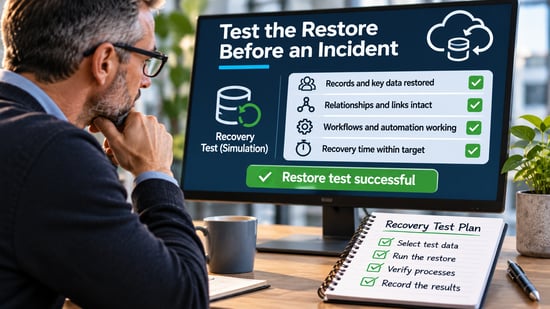
Documentation tells the company what should happen. A restore test shows what actually happens in its own configuration.
A useful test should use representative records rather than a meaningless dummy row. It should include the relationships, custom fields, activities and workflow behavior that make the data useful to the business.
The test should then answer four questions.
- Information — did the expected information return?
- Relationships and process state — did they return as expected?
- Recovery time — how long did it take from detection to a usable business state?
- Repeatability — could the team repeat the process without relying on one individual who happened to know the system?
External IT support can help a startup map dependencies and document procedures. The published services surrounding Reverie Tech's IT expertise include IT assessments, cloud management, monitoring and support—work that can support that governance task while still operating within the SaaS vendor's native architectural limits.
This is also why a successful backup job is not the same thing as a successful recovery test.
That same evidence standard matters when a startup needs to run a real restore test on critical data and record the result rather than rely on a statement that it “has cloud backup.”
A file or snapshot can exist without proving that the business can reassemble the records, relationships and workflows it needs under time pressure.
Build Recovery Testing Into Growth
Startups tend to accumulate SaaS applications gradually.
A CRM is added when the sales team grows. Marketing automation follows. Customer support moves into a specialist platform. Finance adopts subscription billing. Teams connect the systems through integrations and automation.
The company's dependency on the data can increase faster than its understanding of how that data can be recovered.
Recovery testing should therefore be triggered by business change, not only by a security review.
A new mission-critical SaaS platform, a major integration, a migration, a large data import, a new automation that can modify records in bulk or a significant increase in customer volume should all prompt the same question: has the recovery path changed?
This keeps the control proportionate.
The goal is not to create an elaborate disaster-recovery exercise for every application. It is to prevent the company from discovering, during a live incident, that an assumption made when the business was smaller no longer matches the way it operates.
Know What Comes Back Before You Need It
The phrase “the data is in the cloud” can create a false sense of completeness.
Cloud software can be highly available and still contain customer records that users, integrations and automations can delete or alter. Native recovery can be valuable, but the rules differ between platforms and the result may not reproduce every relationship or process that made the record operationally useful.
Decision makers do not need to become backup specialists.
They do need to know which SaaS datasets the business depends on, what failure would break, how long the native recovery path remains open, what a restore actually reconstructs and who has proved that the process works.
The best time to discover that a customer record can be restored but its surrounding workflow cannot is during a controlled test.
Not when the customer is waiting.
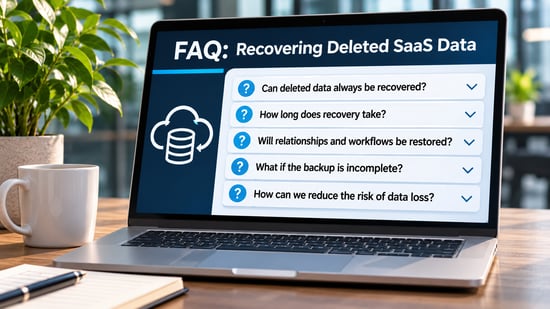
SaaS Customer Record Recovery: Frequently Asked Questions
Is SaaS data automatically backed up by the software provider?
Not in the sense that a business should assume every accidental deletion or data change can be reversed. SaaS vendors protect and operate their platforms, but business-level recovery features, retention periods, and restore behavior vary. The customer should verify the rules for each critical application.
How long can deleted CRM records usually be recovered?
There is no universal period. Under current platform documentation, Salesforce provides a 15-day Recycle Bin period for deleted records, while HubSpot says many HubSpot-defined records can be restored for up to 90 days. Other applications may use different periods or deletion models.
Why is restoring the record itself sometimes not enough?
Business processes often depend on relationships, activities, workflow state, custom fields and integrations around the primary record. If those elements do not return correctly, the record may be visible again while sales, support, billing or automation still behaves differently.
Does every startup need a third-party SaaS backup product?
No. The decision should follow the business impact and the native recovery capability. A startup should first identify critical datasets, understand vendor recovery limits and test the restore. Additional protection is justified when the remaining recovery gap is unacceptable.
How often should a startup test SaaS recovery?
There is no single interval that fits every application. Testing should at least occur when a critical platform, integration, workflow or data model changes materially, and it should be repeated often enough that the people responsible can demonstrate the recovery path still works.