 IT has become a core operating dependency, yet the cost of running it well is rising on two fronts: scarce specialist talent and the operational drag of maintaining systems that are secure, available, and audit-ready.
For many teams, the problem isn’t “we need more tickets closed.” It’s “we need predictable outcomes without building a large, expensive internal IT org.”
That’s where Managed Service Providers (MSPs) can be genuinely useful. The best MSP engagements turn IT from a headcount bottleneck into a managed operating model: clear scope, measurable service levels, known unit costs, and a security baseline that doesn’t rely on heroics.
Key Takeaways: MSPs as a Cost + Capability Hedge
The MSP advantage isn’t “outsourcing IT.” It’s converting fragile, people-dependent operations into a repeatable service, coverage, controls, and predictable costs, especially when hiring and retaining talent is the most expensive line item.
Key takeaways include:
- Lower Talent Exposure: MSPs reduce reliance on hard-to-hire specialists by providing pooled expertise across clients.
- Predictable Operations: SLAs, reporting, and standardized runbooks improve uptime and reduce “firefighting” variability.
- Faster Security Baseline: Mature MSPs bring monitoring, patching cadence, incident response and compliance support as a packaged capability.
- FinOps for IT: Clear ownership, asset discipline, and fixed-vs-variable cost splits make spend easier to govern.
- Execution Speed: MSPs can accelerate projects (cloud moves, endpoint hardening, DR) without hiring a temporary “shadow team.”
Proof point: Benchmarking data commonly cited in HR circles pegs the average cost per hire at ~$4,700 (and often higher for technical roles), before accounting for lost productivity during ramp-up. (Source: SHRM)
The Bottom Line: A good MSP doesn’t just “do IT.” It reduces operational variance: fewer surprises, clearer accountability, and a more controllable cost-to-serve.
The IT Talent Gap Has Become an Operating Cost Problem
When IT roles stay open, the business pays twice: higher recruiting and retention costs on one side, and operational risk on the other (delays, downtime, security exposure, compliance drift). This is why MSPs are increasingly evaluated as an economic decision rather than a tactical one.
Where costs compound (and leaders miss it)
Recruiting drag is more than a hiring fee; it includes interview time, onboarding, ramp-up, and the opportunity cost of your most senior people. Meanwhile, coverage gaps create expensive variance: incidents that spill into nights/weekends, single points of failure, and inconsistent patching and monitoring.
Security exposure compounds when scarce specialists aren’t available to triage alerts, harden endpoints, or quickly close configuration gaps. And tool sprawl quietly inflates spend as overlapping point solutions accumulate, with no single owner accountable for outcomes or costs.
What MSPs Actually Do (and What They Don’t)
An MSP is most valuable when it replaces unmanaged complexity with a defined service model: scope, SLAs, escalation paths, reporting, and continuous improvement. MSPs can cover help desk, endpoint management, network operations, cloud operations, security monitoring, compliance support, and disaster recovery, depending on the contract.
The practical shift: fixed headcount → managed outcomes
Instead of paying for “people,” you pay for a measurable service layer: response times, uptime targets, patching cadence, backup success rates, and security monitoring. That’s also why MSP selection should be run like procurement, not like staff augmentation.
Provider Examples
When you evaluate providers, prioritise proof of process: onboarding plan, RACI clarity, SLA definition, security controls, and reporting quality. If you’re exploring managed IT services, visit Cantey's website to review their offering and how they position scope and support.
Similarly, the support team at Charter Technology demonstrates how MSPs can deliver operational coverage and technical expertise that help businesses maintain continuity during rapid change.
MSP vs Hiring vs Hybrid: A Decision Framework
Use this as a fast filter. It’s not about ideology; it’s about the operating model you can sustain.
| Option | Best-fit scenario | Trade-offs | Watch-outs |
|---|---|---|---|
|
Build in-house |
Stable needs, strong leadership, and the capacity to hire/retain specialists. |
Maximum control; higher fixed cost; slower to scale across specialties. |
Single points of failure; burnout risk; coverage gaps. |
|
MSP-first |
Lean teams, variable demand, need for predictable coverage and faster security baseline. |
Faster capability access; more variable cost; less bespoke customization. |
Scope creep, unclear ownership, “ticket factory” providers. |
|
Hybrid |
Keep strategic IT/product decisions in-house; outsource operations + security monitoring. |
Balanced control and leverage; clearer division of responsibilities. |
Hand-off failures unless RACI + escalation paths are explicit. |
A Practical MSP Engagement Model (What You’re Really Buying)
Before you compare providers, define the service “shape.” Most MSP work falls into a small number of buckets. At the foundation is service desk and endpoint management (provisioning, patching, device security, asset inventory).
Many MSPs also run infrastructure and network operations (monitoring, firewall/VPN management, performance reliability), plus cloud operations and identity (access hygiene, backups, logging, standardization).
For higher-risk environments, MSPs may add security monitoring and incident response (alert triage, escalation, containment support, reporting). Finally, many deliver project work,migrations, DR design, compliance efforts, and tooling improvements under separate scopes, each with its own acceptance criteria and change control.
The best engagements are explicit about which of these buckets are included, which are optional, and what is billed as project work.
The MSP Cost Model: How to Estimate TCO (and Avoid “Bill Shock”)
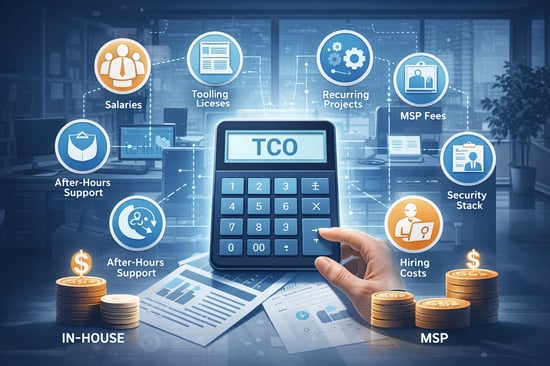 The biggest mistake is comparing an MSP fee to a single salary. A realistic model compares total cost of operating IT across options.
A simple TCO equation
TCO (in-house) ≈ salaries + benefits + recruiting + tooling + security stack + training/certs + after-hours coverage + incident cost + turnover impact.
TCO (MSP) ≈ monthly managed services fee + onboarding/transition + project rates + security add-ons + tool licensing (if separate) + internal owner time.
What typically drives cost (the practical model)
Spend is usually shaped by coverage (business-hours vs 24/7), scope (helpdesk only vs full ops and security), environment complexity (locations, endpoints, systems, cloud footprint), and governance maturity (how well assets, access, and tooling are standardized). If these inputs aren’t defined, pricing comparisons become meaningless.
Common MSP “bill shock” surprises (and how to neutralize them)
Onboarding scope can expand quickly when discovery reveals undocumented assets or overdue remediation; require a priced onboarding plan with deliverables.
After-hours premiums can be hidden behind vague “24/7” language; define severity-based coverage and response times.
Security scope is often split (monitoring included; incident response billed separately). Clarify what incident response includes and who owns remediation.
Tooling ambiguity can inflate costs when licenses are pass-through; list every tool and assign responsibility for each.
Project leakage can become a second bill if “small projects” aren’t bounded; define inclusions/exclusions and lock day rates.
Procurement Checklist: SLAs, Security, Reporting, and Exit
If you want predictable outcomes, your contract must make them measurable. Use the checklist below as a baseline in procurement and renewal reviews.
Service scope and ownership (RACI)
-
Define what the MSP owns end-to-end (and what remains internal).
-
List “included” tasks vs out-of-scope tasks (examples, not just categories).
-
Document escalation paths and decision owners for critical changes.
SLAs that actually matter
-
Response time by severity (P1/P2/P3) and time to restore targets for P1 incidents.
-
Patch cadence (critical patches within X days) and compliance reporting.
-
Backup success rate targets and restore testing frequency.
-
Availability targets for managed systems (and exclusions clearly stated).
Security and compliance expectations
-
MFA and least-privilege access for MSP staff; time-bound admin access where possible.
-
Logging and monitoring coverage, retention, and who reviews what.
-
Incident runbooks, notification timelines, and evidence capture.
-
Support for relevant frameworks (e.g., GDPR, HIPAA, PCI-DSS) and audit assistance scope.
Reporting cadence and governance
-
Monthly KPI pack: ticket volume, response times, patch compliance, backup success, top recurring issues.
-
Quarterly service review: root causes, remediation roadmap, and cost optimization opportunities.
Exit plan (most teams forget this)
-
Documentation ownership, credential transfer process, tooling handoff, and transition support pricing.
-
Clear data portability terms and timelines.
A Real-World (Anonymized Composite) Example With Metrics
The example below is an anonymized composite to illustrate planning and measurement. Outcomes vary by environment, scope, and provider maturity.
Starting point
A 150-person services business ran IT with two internal generalists while security and compliance expectations increased. The organization saw recurring endpoint issues, uneven patching, slow onboarding/offboarding, and limited after-hours coverage, creating risk and slowing operational execution.
Approach
In month one, the MSP completed onboarding: asset inventory, documentation, a standard device baseline, and helpdesk SLAs. In month two, the focus shifted to operational hygiene, patch compliance, backup verification, MFA enforcement, and a privileged access process. By month three, security monitoring, incident runbooks, and a quarterly risk review cadence created a repeatable operating rhythm.
Measured outcomes over 90 days
The business improved reliability by reducing repeat incidents after patching, and device baselines became consistent. Leadership gained visibility through a monthly KPI pack (tickets, response times, patch status, backup success) instead of anecdotal updates. Most importantly, the company moved from reactive firefighting to managed accountability, creating a foundation for later cost optimization.
Implementation Playbook: Your First 30/60/90 Days With an MSP
Days 0–30: Baseline and control
-
Complete inventory (users, devices, systems), document ownership, and set the escalation model.
-
Enforce MFA + admin access controls, implement ticketing discipline, and define severity rules.
-
Stand up reporting: ticket SLAs, patch compliance, backup success, and top recurring issues.
Days 31–60: Stabilize and reduce repeat incidents
-
Standardize device baselines and patch cadence; reduce tool overlap and “shadow IT.”
-
Harden backups and test restores; implement runbooks for frequent incidents.
-
Introduce quarterly risk review and remediation backlog.
Days 61–90: Optimize cost-to-serve
-
Audit recurring tickets and eliminate root causes (policy, automation, training).
-
Review licensing/tool spend; align costs to owners and business units.
-
Decide what to keep internal (strategy, product-aligned IT) vs what the MSP should own (operations + monitoring).
The CFO’s FAQ: Five Questions That Prevent a Bad MSP Contract

How do we compare an MSP to hiring without fooling ourselves?
Model the total cost of operating IT, not just salaries. Include recruiting costs, after-hours coverage, tooling, security stack, training/certs, and the productivity impact of incidents. Then compare it to an MSP’s total: monthly fee + onboarding + projects + add-ons + internal owner time. The winner is the option that produces measurable outcomes with the least variance.
What should we demand in SLAs beyond “response time”?
Response time is only the start. Ask for time-to-restore targets for critical incidents, patch cadence commitments, backup success rates, restore testing frequency, and reporting obligations. SLAs should align with business risks: downtime, security exposure, and compliance readiness.
What’s the fastest way to detect a “ticket factory” MSP?
Look for vague scope, weak onboarding plans, and generic reporting. Strong providers show a remediation roadmap, root-cause analysis cadence, and clear ownership boundaries. If they can’t explain how they reduce recurring ticket volume over time, you may be buying perpetual churn.
How do we keep security from becoming an expensive add-on later?
Define security scope at contract time: MFA/privileged access standards, monitoring coverage, incident response responsibilities, logging retention, and who owns remediation. If monitoring is included but response is not, you may still be under-protected when an event happens. Align security deliverables to your real risk profile and regulatory constraints.
What’s the biggest “hidden risk” in MSP engagements?
Exit and continuity risk. If documentation, credentials, tooling configuration, and asset ownership aren’t clearly defined in the contract, switching providers becomes painful and expensive. Build an exit plan upfront: documentation standards, credential escrow/transfer process, handover support, and data portability timelines.