 A B2B sales team may rely on its CRM, prospecting database, email sequencer, meeting scheduler, reporting dashboards, and a growing collection of specialist applications. Most are introduced to solve a real problem. Yet an integration that was useful six months ago can remain connected long after its owner has changed roles or its original purpose has disappeared.
That forgotten connection deserves attention because an unused interface is not necessarily an inactive permission. Depending on how it was configured, a third-party application may still be authorized to read contact records, update opportunities, export customer information, or run automated workflows. The result is not simply another cybersecurity issue: it can affect pipeline accuracy, customer confidentiality, and the reliability of the systems on which revenue teams depend.
The objective is not to stop salespeople adopting useful tools. It is to know which applications can reach business data, why that access exists, who is accountable for it, and when it should end.
Why Hidden Applications Pose a Significant Threat
The exposure often begins with an ordinary request. A salesperson authorizes a note-taking assistant, a manager tests a forecasting plugin, or an operations analyst connects a spreadsheet tool to the CRM. Each may work as intended, but an integration that is no longer reviewed can retain permissions far wider than its current business need.
The access mechanism matters. Single sign-on (SSO) primarily manages authentication, while OAuth permissions can authorize a third-party application to access specific data or perform actions through an API. API keys, service accounts, browser extensions, and webhooks create other paths between systems. Removing an application from a dashboard does not necessarily revoke every credential or authorization behind it.
A forgotten reporting connector with read access might expose customer lists or deal notes if its credentials are compromised. An integration with write access could alter records, create duplicates, or trigger unwanted automations. Even a well-intentioned tool can damage data quality when two systems continuously overwrite each other's updates.
For sales leadership, this creates two linked risks: unauthorized access to commercially sensitive information and a less trustworthy view of pipeline activity. Both deserve consideration when deciding which integrations to keep.
The Growing Scale of Shadow IT in Sales Environments
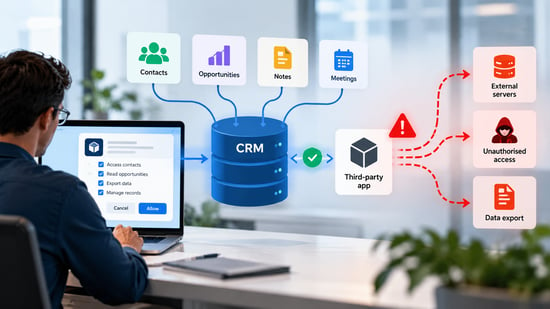
Shadow IT describes technology adopted outside an organization's approved oversight process. It can include an entirely unapproved application, but it can also involve a legitimate tool that an employee connected without recording its permissions, owner, or retention requirements. The problem is therefore not always the product itself; often it is the absence of governance around its use.
The consequences are not hypothetical. In August 2025, Google Threat Intelligence reported a data-theft campaign in which attackers used compromised OAuth tokens associated with the Salesloft Drift integration to access Salesforce customer environments.
The incident illustrated how a trusted third-party connection can become an access route even when the underlying CRM platform is not itself compromised. Microsoft's 2026 analysis of SaaS-focused attacks similarly identified abuse of OAuth consent and trusted integrations.
Not every forgotten tool is malicious, and a dormant application is not proof of a breach. Risk depends on factors such as the breadth of its permissions, the sensitivity of accessible records, whether credentials remain valid, and the strength of monitoring. Those distinctions are more useful than headline statistics that do not explain a company's actual exposure.
Protecting Your Sales Stack: The Role of Expert IT Management
A workable response brings sales operations, IT, security, and procurement into the same process. Sales leaders can identify which workflows are genuinely valuable; technical owners can determine what each integration is allowed to access; and security teams can evaluate whether the access is proportionate to the business purpose.
Outside support can help when a company lacks the capacity to examine SaaS permissions, identity settings, integration logs, and vendor controls internally. For example, teams assessing managed support may see what Contego offers; organizations seeking a regional provider may also compare services for IT managed for Tampa businesses.
The relevant buying question in either case is whether the provider can review cloud-application access and coordinate remediation with the CRM administrator, not merely maintain devices or networks.
Before engaging a provider, clarify who owns integration discovery, who can revoke access, how urgent findings are escalated, and what evidence will be supplied after remediation. Those responsibilities should remain explicit even when monitoring is outsourced.
Practical Steps to Identify and Manage Hidden Sales Apps
Start With an Inventory That Includes Permissions
Begin with the CRM's connected-app register, identity-provider consent records, integration marketplaces, service accounts, and relevant subscription or expense records. Ask sales teams about tools used for prospecting, enrichment, meeting capture, reporting, and workflow automation. Network monitoring can reveal some usage, but cloud-to-cloud API connections may not appear in a traditional device or network inventory.
For each connection, record the application name, business owner, approving administrator, connected systems, permission scopes, data categories, last observed activity, and renewal or review date. A name-only inventory is insufficient: a meeting assistant that can read a calendar presents a different exposure from a tool able to export the entire CRM.
Prioritize Access That Creates the Greatest Exposure
Review the highest-risk connections first: those with broad read or write permissions, access to sensitive customer information, privileged service accounts, unknown owners, or unexplained activity. A connection with limited permissions and an active, documented purpose may reasonably remain in place. An app with no accountable owner and extensive CRM access deserves prompt investigation, even if it appears rarely used.
For instance, a lead-enrichment tool used only to update company size should not automatically need access to contract attachments, deal notes, or administrative settings. Reducing its permissions may preserve the workflow while materially narrowing the impact of a future compromise.
Revoke Access Without Breaking Revenue Workflows
Before disconnecting a tool, check whether it supports live sequences, customer communications, scheduled reporting, or CRM synchronization. Arrange a replacement or a controlled pause if necessary, then preserve relevant logs, revoke OAuth grants or other tokens, disable associated service credentials, and confirm that the connection can no longer retrieve or modify data. Depending on the platform, deleting the application's user-facing entry alone may not complete this process.
Official guidance illustrates the distinction. Salesforce documents how users can review and revoke connected-app access, while Microsoft explains how administrators can inspect and revoke permissions granted to enterprise applications. Teams should follow the procedures for their own systems and check whether data previously exported to a third party is subject to separate retention or deletion requirements.
Make Approval and Offboarding Repeatable
Introduce a lightweight approval path for new integrations: state the use case, name an owner, request the minimum permissions, and set a review date. Link employee departures and role changes to an application-access review, including individual authorizations and shared integration accounts. Revisit high-impact connections regularly and whenever a vendor suffers a security incident or materially changes its permissions.
Training should show salespeople how to recognize excessive permission requests and where to propose useful tools. A fast, clear route to approval is often more effective than a blanket prohibition that encourages employees to bypass the process.
The Business Impact of Securing Your Sales Technology
Cleaning up the integration layer can deliver more than a smaller attack surface. It can reduce duplicate contact records, conflicting field updates, broken automations, and the operational time spent reconciling inconsistent reports. For a revenue team, those improvements support cleaner account assignments, more dependable forecasts, and fewer interruptions to customer-facing work.
It also creates a more defensible conversation with prospective customers. Security-conscious buyers may ask which vendors handle their information, how access is controlled, and what happens when an integration is retired. An accurate application register and a repeatable access-review process make those questions easier to answer than vague assurances that the organization takes security seriously.
Leaders should measure the programme using practical indicators: the proportion of integrations with a named owner, the number of excessive-permission grants corrected, the time taken to retire unused access, and the frequency of sync-related data errors. These measures show whether governance is reducing exposure without obstructing legitimate sales activity.
Looking Ahead: Staying Ahead of the Hidden App Threat
As teams add AI assistants, enrichment services, and workflow agents, they are also adding more connections to CRM and communication systems. Some operate with delegated user permissions; others rely on service identities or automation credentials that are less visible to ordinary users. The inventory must evolve with those patterns rather than assume every connection belongs to a named employee.
Automated discovery and anomaly detection can help identify unfamiliar applications or unusual API activity, but they cannot decide whether an integration serves a legitimate business purpose. That judgement still requires sales and technical ownership, supported by documented access requirements and incident-response procedures.
The strongest long-term approach combines permission visibility, periodic reviews, clear accountability, and a straightforward way for sales teams to obtain approved tools. Security is more sustainable when it protects the workflows that create revenue rather than treating every new application as a problem.
Keep the Revenue Engine Connected, Not Exposed
The highest-risk application in a sales stack is not necessarily its newest or most expensive. It may be a forgotten integration that still holds broad access, has no responsible owner, and sits outside routine review. Locating those connections, assessing their permissions, and removing unnecessary access can protect customer information while improving the reliability of sales operations.
The practical next step is a targeted audit of the CRM and identity environment, starting with integrations that can export data or change records. Keep useful connections, narrow excessive permissions, and retire those with no justified purpose. That is how a sales technology stack remains both productive and accountable as the business grows.
Before You Disconnect: Questions Sales and Security Leaders Should Ask

Does removing a former employee's account automatically disable the apps they connected?
Not always. Some integrations depend on that user's delegated access, while others use shared service accounts, application permissions, or credentials that remain valid independently. Offboarding should include a review of the person's app grants and any automation or integration accounts they administered.
How can a company tell whether a third-party app has already copied customer data?
Review the available API activity, access logs, export history, and vendor audit records, while recognizing that retention periods and logging detail vary. A lack of recent activity does not establish that data was never exported. If sensitive information may have left the system, assess the third party's retention terms and involve the appropriate security and privacy personnel.
Should every unused integration be removed immediately?
Unused access should not remain indefinitely, but immediate removal can interrupt a scheduled process or hide evidence needed for an investigation. Prioritize connections by permission scope, data sensitivity, and suspected misuse, and coordinate changes with their business owners. If an application appears compromised, containment may take precedence over normal change-management sequencing.
What should sales leaders ask before approving an AI assistant connected to the CRM?
Ask what information the assistant can read, whether it can write or export records, how customer data is stored, and whether that data is used for model training. Confirm that the requested permissions match the task and that administrators can monitor and revoke them. Pilot the tool with limited access before authorizing a broader deployment.
How can teams prove that an integration cleanup has worked?
Establish a baseline before remediation and compare it with later reviews: owned versus unowned connections, high-risk grants, inactive credentials, and the time required to remove access. Pair those security measures with operational indicators such as failed sync jobs and duplicate-record rates. A credible result shows both reduced unnecessary access and continued reliability in the workflows salespeople actually use.